This is a wrong belief because a) SSDs make swap almost invisible, so you can have that escape ramp if something goes wrong b) SWAP space is not solely an escape ramp which RAM overflows into anymore.
In the age of microservices and cattle servers, reboot/reinstall might be cheap, but in the long run it is not. A long running server, albeit being cattle, is always a better solution because esp. with some excess RAM, the server "warms up" with all hot data cached and will be a low latency unit in your fleet, given you pay the required attention to your software development and service configuration.
Secondly, Kernel swaps out unused pages to SWAP, relieving pressure from RAM. So, SWAP is often used even if you fill 1% of your RAM. This allows for more hot data to be cached, allowing better resource utilization and performance in the long run.
So, eff it, we ball is never a good system administration strategy. Even if everything is ephemeral and can be rebooted in three seconds.
Sure, some things like Kubernetes forces "no SWAP, period" policies because it kills pods when pressure exceeds some value, but for more traditional setups, it's still valuable.
My work Ubuntu laptop has 40GB of RAM and and a very fast Nvme SSD, if it gets under memory pressure it slows to a crawl and is for all practical purposes frozen while swapping wildly for 15-20 minutes.
So no, my experience with swap isn't that it's invisible with SSD.
I don't know your exact situation, but be sure you're not mixing up "thrashing" with "using swap". Obviously, thrashing implies swap usage, but not the other way around.
I get it that the distinction is real but nobody using the machine cares at this point. It must not happen and if disabling swap removes it then people will disable swap.
I've experimented with no-swap and find the same thing happens. I think the issue is that linux can also evict executable pages (since it can just reload them from disk).
I've had good experience with linux's multi-generation LRU feature, specifically the /sys/kernel/mm/lru_gen/min_ttl_ms feature that triggers OOM-killer when the "working set of the last N ms doesn't fit in memory".
It's seldom invisible, but in my experience how visible it is depends on the size/modularity/performance/etc of what's being swapped and the underlying hardware.
On my 8gb M1 Mac, I can have a ton of tabs open and it'll swap with minimal slowdown. On the other hand, running a 4k external display and a small (4gb) llm is at best horrible and will sometimes require a hard reset.
I've seen similar with different combinations of software/hardware.
Linux being absolute dogshit if it’s under any sort of memory pressure is the reason, not swap or no swap. Modern systems would be much better off tweaking dirty bytes/ratios, but fundamentally the kernel needs to be dragged into the XXI century sometime.
It's kind of solved since kernel 6.1 with MGLRU, see above.
Dirty buffer should also be tuned (limited), absolutely. Default is 20% of RAM, (with 5 second writeback and 30 second expire intervals), which is COMPLETELY insane. I limit it to 64 MB max usually, with 1 second writeback and 3 second expire intervals.
This is not really true of most SSDs. When Linux is really thrashing the swap it’ll be essentially unusable unless the disk is _really_ fast. Fast enough SSDs are available though. Note that when it’s really thrashing the swap the workload is 100% random 4KB reads and writes in equal quantities. Many SSDs have high read speeds and high write speeds but have much worse performance under mixed workloads.
I once used an Intel Optane drive as swap for a job that needed hundreds of gigabytes of ram (in a computer that maxed out at 64 gigs). The latency was so low that even while the task was running the machine was almost perfectly usable; in fact I could almost watch videos without dropping frames at the same time.
Do you know how the le9 patch compares to mg_lru? The latter applies to all memory, not just files as far as I can tell. The former might still be useful in preventing eager OOM while still keeping executable file-backed pages in memory?
le9 is a 'simple' method to keep the fixed amount of the page cache. It works exceptionally well for what it is, but it requires manual tuning of the amount of cache in MB.
MGLRU is basically a smarter version of already existing eviction algorithm, with evicts (or keeps) both page cache and anon pages, and combined with min_ttl_ms it tries to keep current active page cache for a specified amount of time. It still takes into account swappiness and does not operate on a fixed amount of page cache, unlike le9.
Both are effective in trashing prevention, both are different. MGLRU, especially with higher min_ttl_ms, could cause OOM killer more frequently than you'd like it to be called. I find le9 more effective for desktop use on old low-end machines, but that's only because it just keeps the (large/er amounts of) page cache. It's not very preferable for embedded systems for example.
That may be the intention, but you shouldn’t rely on it. In practice the average IO size is, or at least was, almost always 4KB.
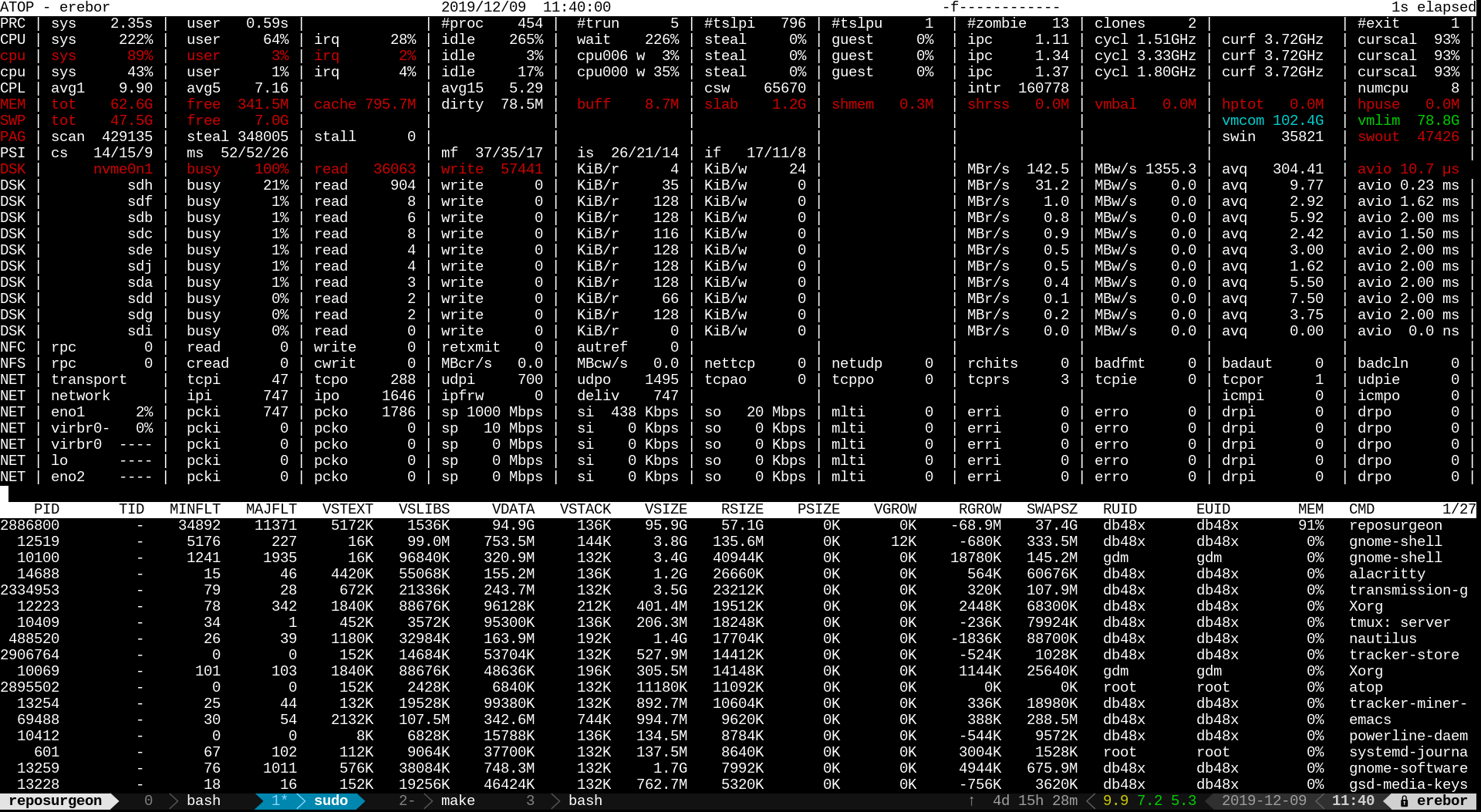
Here’s a screenshot from atop while the task was running: <https://db48x.net/temp/Screenshot%20from%202019-11-19%2023-4...>. Note the number of page faults, the swin and swout (swap in and swap out) numbers, and the disk activity on nvme0n1. Swap in is 150k, and the number of disk reads was 116k with an average size of 6KB. Swap out was 150k with 150k disk writes of 4KB. It’s also reading from sdh at a fair clip (though not as fast as I wanted!)
<https://db48x.net/temp/Screenshot%20from%202019-12-09%2011-4...> is interesting because it actually shows 24KB average write size. But notice that swout is 47k but there were actually 57k writes. That’s because the program I was testing had to write data out to disk to be useful, and I had it going to a different partition on the same nvme disk. Notice the high queue depth; this was a very large serial write. The swap activity was still all 4KB random IO.
That's surprising. Do you know what your application memory access pattern is like, is it really this random and the single page io is working along its grain, or is the page clustering, io readahead etc just MIA?
I didn’t delve very deep into it, but the program was written in Go. At this point in the lifecycle of the program we had optimized it quite a bit, removing all the inefficiencies that we could. It was now spending around two thirds of its cpu cycles on garbage collection. It had this ridiculously large heap that was still growing, but hardly any of it was actually garbage.
I rewrote a slice of the program in Rust with quite promising results, but by that time there wasn’t really any demand left. You see, one of the many uses of Reposurgeon <http://www.catb.org/esr/reposurgeon/> is to convert SVN repositories into Git repositories. These performance results were taken while reposurgeon was running on a dump of the GCC source code repository. At the time this was the single largest open source SVN repository left in the world with 287k commits. Now that it’s been converted to a Git repository it’s unlikely that future Reposurgeon users will have the same problem.
Also, someone pointed out that MG-LRU <https://docs.kernel.org/admin-guide/mm/multigen_lru.html> might help by increasing the block size of the reads and writes. It was introduced a year or more after I took these screenshots, so I can’t easily verify that.
How long is long running? You should be getting the warm caches after at most a few hours.
> Secondly, Kernel swaps out unused pages to SWAP, relieving pressure from RAM. So, SWAP is often used even if you fill 1% of your RAM. This allows for more hot data to be cached, allowing better resource utilization and performance in the long run.
Yes, and you can observe that even in your desktop at home (if you are running something like Linux).
> So, eff it, we ball is never a good system administration strategy. Even if everything is ephemeral and can be rebooted in three seconds.
I wouldn't be so quick. Google ran their servers without swap for ages. (I don't know if they still do it.) They decided that taking the slight inefficiency in memory usage, because they have to keep the 'leaked' pages around in actual RAM, is worth it to get predictability in performance.
For what it's worth, I add generous swap to all my personal machines, mostly so that the kernel can offload cold / leaked pages and keep more disk content cached in RAM. (As a secondary reason: I also like to have a generous amount of /tmp space that's backed by swap, if necessary.)
With swap files, instead of swap partitions, it's fairly easy to shrink and grow your swap space, depending on what your needs for free space on your disk are.
> Yes, and you can observe that even in your desktop...
Yup, that part of my comment was culmination of using Linux desktops for the last two decades. :)
> I wouldn't be so quick. Google ran their servers without swap for ages.
If you're designing this from get go and planning accordingly, it doesn't fit into my definition of eff it, we ball, but let's try this and see whether we can make it work.
> With swap files, instead of swap partitions,...
I'm a graybeard. I eyeball a swap partition size while installing the OS, and just let it be. Being mindful and having good amount of RAM means that SWAP acts as a eviction area for OS first, and as an escape ramp second, in very rare cases.
It doesn't. SSDs came a long way but so did memory dies and buses, and with that the way programs work also changed as more and more they are able to fit their stacks and heaps on memory more often than not.
I have had a problem with shellcheck that for some reason eats up all my ram when I open I believe .zshrc and trust me, it's not invisible. The system crawls to a halt.
If we're talking about SATA SSDs which top at 600MBps, then yes, an aggressive application can make itself known. However, if you have a modern NVMe, esp. a 4x4 one like Samsung 9x0 series or if you're using a Mac, I bet you'll notice the problem much later, if ever. Remember the SSD trashing problem on M1 Macs? People never noticed that system used SWAP that heavily and trashed the SSD on board.
Then, if you're using a server with a couple of SAS or NVMe SSDs, you'll not notice the problem again, esp. if these are backed by RAID (even md counts).
Now that you say, I have a new Lenovo yoga with those SoC ram with crazy parallel channel config (16gb spread across 8 dies of 2gb). It's noticeably faster than my Acer nitro with dual channel 16gb ddr5. I'll check that, but I'd say it's not what the average home user (and even server I'd risk saying) would have.
> it's not invisible. The system crawls to a halt.
I’m gonna guess you’re not old enough to remember computers with memory measured in MB and IDE hard disks? Swapping was absolutely brutal back then. I agree with the other poster, swap hitting an SSD is a barely noticeable in comparison.
I think I've not made myself as clear as I could. Swap is important for efficient system performance way before you hit OOM on main memory. It's not, however, going to save system responsiveness in case of OOM. This is what I mean.
The trade-off depends on how your system is set up.
Eg Google used to (and perhaps still does?) run their servers without swap, because they had built fault tolerance in their fleet anyway, so were happier to deal with the occasional crash than with the occasional slowdown.
For your desktop at home, you'd probably rather deal with a slowdown that gives you a chance to close a few programs, then just crashing your system. After all, if you are standing physically in front of your computer, you can always just manually hit the reset button, if the slowdown is too agonising.
Swap delays the 'fundamental issue', if you have a leak that keeps growing.
If your problem doesn't keep growing, and you just have more data that programs want to keep in memory than you have RAM, but the actual working set of what's accessed frequently still fits in RAM, then swap perfectly solves this.
Think lots of programs open in the background, or lots of open tabs in your browser, but you only ever rapidly switch between at most a handful at a time. Or you are starting a memory hungry game and you don't want to be bothered with closing all the existing memory hungry programs that idle in the background while you play.
I run a chat server on a small instance; when someone uploads a large image to the chat, the 'thumbnail the image' process would cause the OOM-killer to take out random other processes.
Adding a couple of gb of swap means the image resizing is _slow_, but completes without causing issues.
The problem is freezing the system for hours or more to delay the issue is not worth it. I'd rather a program get killed immediately than having my system locked up for hours before a program gets killed.
The fundamental issue here is what the linux fanboys literally think what killing a working process and most of the time the process[0] is a good solution for not solving the fundamental problem of memory allocation in the Linux kernel.
Availability of swap allows you to avoid malloc failure in a rare case your processes request more memory than physically (or 'physically', heh) present in the system. But in the mind of so called linux administrators even if a one byte of the swap would be used then the system would immediately crawl to a stop and never would recover itself. Why it always should be the worst and the most idiotic scenario instead of a sane 'needed 100MB more, got it - while some shit in the memory which wasn't accessed since the boot was swapped out - did the things it needed to do and freed that 100MB' is never explained by them.
[0] imagine a dedicated machine for *SQL server - which process would have the most memory usage on that system?
Also: When those processes that haven't been active since boot (and which may never be active again) are swapped out, more system RAM can become available for disk caching to help performance of things that are actively being used.
And that's... that's actually putting RAM to good use, instead of letting it sit idle. That's good.
(As many are always quick to point out: Swap can't fix a perpetual memory leak. But I don't think I've ever seen anyone claim that it could.)
What if I care more about the performance of things that aren't being used right now than the things that are? I'm sick of switching to my DAW and having to listen to my drive thrash when I try to play a (say) sampler I had loaded.
Detecting things are down is far easier than detecting things are slow.
I'd rather that oom started killing things though than a kernel panic or a slow system. Ideally the thing that is leaking, but if not the process using the most memory (and yes I know that "using" is tricky)
I don't count crawling to a halt as a working machine. Plus it depends. Back in the day I had computers that got blocked for 30-ish seconds which was annoying but gave you the window of opportunity to go kill the offending program. But then you had some that we left, out of curiosity, to work throughout the entire workday and they never recovered.
So most of the time I'd prefer option 3: the OOM killer to reap a few offending programs and let me handle restarting them.
From my understanding, the comment I'm replying to uses EC2 example to portray that swapping is wrong in any and all circumstances, and I just replied with my experience with my system administrator hat.
I'm not an AWS guy. I can see and touch the servers I manage, and in my experience, SWAP works, and works well.
Just for context EC2 typically uses network storage that, for obvious reasons, often has fairly rubbish latency and performance characteristics. Swap works fine if you have local storage, though obviously it burns through your SSD/NVME drive faster and can other side effects on it's performance (usually not particularly noticeable).
Thanks, I'll keep that in mind if I start to use EC2 for workloads.
However, from my experience, normal (eviction based) usage of SWAP doesn't impact the life of an SSD in a measurable manner. My 256GB system SSD (of my desktop system) shows 78% life remaining after 4 years of power on hours, which also served as /home for at least half of its life.
You don't care about life of any hardware in the cloud, that doesn't really matter either unless you work for the cloud provider in their datacenter teams.
A long running Linux system uses 100% of its RAM. Every byte unused for applications will be used as a disk cache, given you read more data than your total RAM amount.
This cache is evictable, but it'll be there eventually.
Linux used to don't touch unused pages in the RAM in the older days if your RAM was not under pressure, but now it swaps out pages unused for a long time. This allows more cache space in RAM.
> how does caching to swap help?
I think I failed to convey what I tried to say. Let me retry:
Kernel doesn't cache to SSD. It swaps out unused (not accessed) but unevictable pages to SWAP, assuming that these pages will stay stale for a very long time, allowing more RAM to be used as cache.
When I look to my desktop system, in 12 days, Kernel moved 2592MB of my RAM to SWAP despite having ~20GB of free space. ~15GB of this free space is used as disk cache.
So, to have 2.5GB more disk cache, Kernel moved 2592 MB of non-accessed pages to SWAP.
Yes, and if I am writing an API service, for example, I don’t want to suddenly add latency because I hit pages that have been swapped out. I want guarantees about my API call latency variance, at least when the server isn’t overloaded.
I DON’T WANT THE KERNEL PRIORITIZING CACHE OVER NRU PAGES.
You better not write your API in Python, or any language/library that uses amortised algorithms in the standard (like Rust and C++ do). And let's not mention garbage collection.
If you're getting this far into the details of your memory usage, shouldn't you use mlock to actually lock in the parts of memory you need to stay there? Then you get to have three tiers of priority: pages you never want swapped, cache, then pages that haven't been used recently.
If you’re writing services in anything higher level than C you’re leaking something somewhere that you probably have no idea exists and the runtime won’t ever touch again.
That’s a fair question. A page is the smallest allocatable unit of RAM, from the OS/kernel perspective. The size is set by the CPU, traditionally 4kB, but these days 8kB-4MB are also common.
When you call malloc(), it requests a big chunk of memory from the OS, in units of pages. It then uses an allocator to divide it up into smaller, variable length chunks to form each malloc() request.
You may have heard of “heap” memory vs “stack” memory. The stack of course is the execution/call stack, and heap is called that because the “heap allocator” is the algorithm originally used for keeping track of unused chunks of these pages.
(This is beginner CS stuff so sorry if it came off as patronizing—I assume you’re either not a coder or self-taught, which is fine.)
You already maxed it from Kernel's PoV.
8GB of RAM, where 6.8GB is cache. ~700MB is resident and 459 is free because I assume Kernel wants to have some free space to allocate something quite fast.
25MB swap use seems normal for a server which doesn't juggle much tasks, but works on one.
If you are interested in human consumption, there's "free --human" which decided on useful units by itself. The "--human" switch is also available for "du --human" or "df --human" or "ls -l --human". It's often abbreviated as "-h", but not always, since that also often stands for "--help".
Thanks, I generally use free -m since my brain can unconsciously parse it after all these years. ls -lh is one of my learned commands though. I type it in automatically when analyzing things.
ls -lrt, ls -lSh and ls -lShr are also very common in my daily use, depending on what I'm doing.
So that 2M of used swap is completely irrelevant. Same on my laptop
               total        used        free      shared  buff/cache   available
    Mem:           31989       11350        4474        2459       16164       19708
    Swap:           6047          20        6027
My syslog server on the other hand (which does a ton of stuff on disk) does use swap
    Mem:            1919         333          75           0        1511        1403
    Swap:           2047         803        1244
With uptime of 235 days.
If I were to increase this to 8G of ram instead of 2G, but for arguments sake had to have no swap as the tradeoff, would that be better or worse. Swap fans say worse.
> So that 2M of used swap is completely irrelevant.
As I noted somewhere, my other system has 2,5GB of SWAP allocated over 13 days. That system is a desktop system and juggles tons of things everyday.
I have another server with tons of RAM, and the Kernel decided not to evict anything to SWAP (yet).
> If I were to increase this to 8G of ram instead of 2G, but for arguments sake had to have no swap as the tradeoff, would that be better or worse. Swap fans say worse.
I'm not a SWAP fan, but I support its use. On the other hand I won't say it'd be worse, but it'd be overkill for that server. Maybe I can try 4, but that doesn't seem to be necessary if these numbers are stable over time.
The OS uses almost all the ram in your system (it just doesn't tell you because then users complain that their OS is too ram heavy). The primary thing it uses it for is caching as much of your storage system as possible. (e.g. all of the filesystem metadata and most of the files anyone on the system has touched recently). As such, if you have RAM that hasn't been touched recently, the OS can page it out and make the rest of the system faster.
At the cost of tanking performance for the less frequently used code path. Sometimes it is more important to optimize in ways that minimize worst case performance rather than a marginal improvement to typical work loads. This is often the case for distributed systems, e.g. SaaS backends.
This is not about belief, but lived experience. Setting up swap to me is a choice between a unresponsive system (with swap) or a responsive system with a few oom kills or downed system.
Swap also works really well for desktop workloads. (I guess that's why Apple uses it so heavily on their Macbooks etc.)
With a good amount of swap, you don't have to worry about closing programs. As long as your 'working set' stays smaller than your RAM, your computer stays fast and responsive, regardless of what's open and idling in the background.
It doesn’t happen often, and I have a multi user system with unpredictable workloads. It’s also not about swap filling up, but giving the pretense the system is operable in a memory exhausted state which means oom killer doesn’t run, but the system is unresponsive and never recovers.
Without swap oom killer runs and things become responsive.


In the age of microservices and cattle servers, reboot/reinstall might be cheap, but in the long run it is not. A long running server, albeit being cattle, is always a better solution because esp. with some excess RAM, the server "warms up" with all hot data cached and will be a low latency unit in your fleet, given you pay the required attention to your software development and service configuration.
Secondly, Kernel swaps out unused pages to SWAP, relieving pressure from RAM. So, SWAP is often used even if you fill 1% of your RAM. This allows for more hot data to be cached, allowing better resource utilization and performance in the long run.
So, eff it, we ball is never a good system administration strategy. Even if everything is ephemeral and can be rebooted in three seconds.
Sure, some things like Kubernetes forces "no SWAP, period" policies because it kills pods when pressure exceeds some value, but for more traditional setups, it's still valuable.